
Workflow Layout Precondition
In this example, we will use the DWG Processor GetDWGInfo method to retrieve the current layout, then use a workflow Precondition event to prevent a state change based on the current layout.
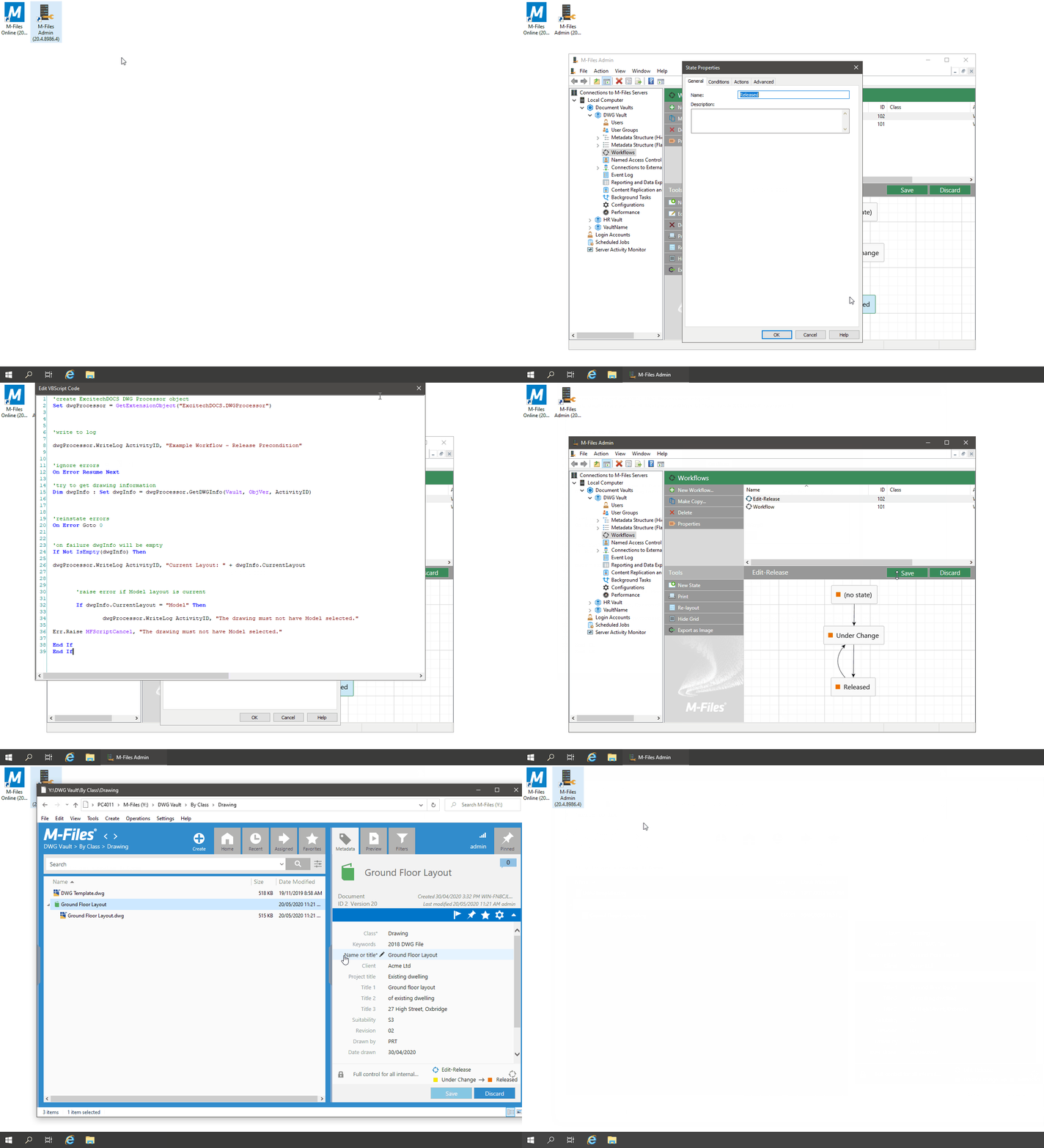
Example
- Open the M-Files Admin, then expand 'Connections to M-Files Servers\Local Computer\Document Vaults'
- Expand out the desired vault and select the 'Workflows' node
- Configure a simple workflow as shown
- Double-click the state you wish to restrict (e.g. Released)
- In the 'State Properties' dialog, select the 'Conditions' tab
- Check the 'Advanced conditions (VBScript)' option in the Preconditions section, then click the 'Edit Code' button
- In the 'Edit VBScript Code' window, add the following code:
'create ExcitechDOCS DWG Processor object
Set dwgProcessor = GetExtensionObject("ExcitechDOCS.DWGProcessor")
'write to log
dwgProcessor.WriteLog ActivityID, "Example Workflow - Release Precondition"
'ignore errors
On Error Resume Next
'try to get drawing information
Dim dwgInfo : Set dwgInfo = dwgProcessor.GetDWGInfo(Vault, ObjVer, ActivityID)
'reinstate errors
On Error Goto 0
'on failure dwgInfo will be empty
If Not IsEmpty(dwgInfo) Then
dwgProcessor.WriteLog ActivityID, "Current Layout: " + dwgInfo.CurrentLayout
'raise error if Model layout is current
If dwgInfo.CurrentLayout = "Model" Then
dwgProcessor.WriteLog ActivityID, "The drawing must not have Model selected."
Err.Raise MFScriptCancel, "The drawing must not have Model selected."
End If
End If

When trying to move a DWG file to the Released workflow state, the transition is prevented if the DWG has the Model layout selected. The M-Files client also displays a dialog box, as shown below:
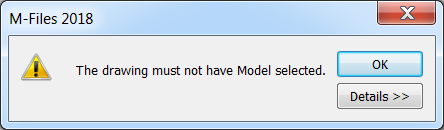
The resulting log file would contain the following information:
01/01/2019 09:00:00:4144 - Example Workflow - Release Precondition
01/01/2019 09:00:00:4174 - Get Drawing Information
01/01/2019 09:00:00:4264 - DWG File Count: 1
01/01/2019 09:00:00:4274 - Creating RealDWG COM Object. (dllhost.exe)
01/01/2019 09:00:00:6844 - Call GetDrawingInformation COM method.
01/01/2019 09:00:00:7324 - FileVer: ID 16 Version 5
01/01/2019 09:00:00:7374 - Download DWG to temp file: C:\ProgramData\Excitech Docs\DWG Processor\Temp\bbqnxckf.dwg
01/01/2019 09:00:00:7614 - Open DWG file
01/01/2019 09:00:00:8334 - Create DrawingInfo object
01/01/2019 09:00:00:8344 - Populate file format
01/01/2019 09:00:00:8354 - Populate current layout: A1
01/01/2019 09:00:00:8364 - Populate Layout array
01/01/2019 09:00:00:8514 - Populate DWG References
01/01/2019 09:00:00:8574 - Populate Image References
01/01/2019 09:00:00:8594 - Populate PDF References
01/01/2019 09:00:00:8674 - Delete temp files from server
01/01/2019 09:00:01:0395 - Deserialize drawing information from JSON.
01/01/2019 09:00:01:0395 - Releasing COM object.
01/01/2019 09:00:01:0415 - Current Layout: Model
01/01/2019 09:00:01:0425 - The drawing must not have Model selected.