
Update DWG Titleblock on SetProperties
In this example we will use the DWG Processor SyncPropertiesFromMFiles method to update attributes in a DWG titleblock. For this example we will attach the code to the AfterSetProperties event. This will update the DWG titleblock whenever the object metadata is edited.

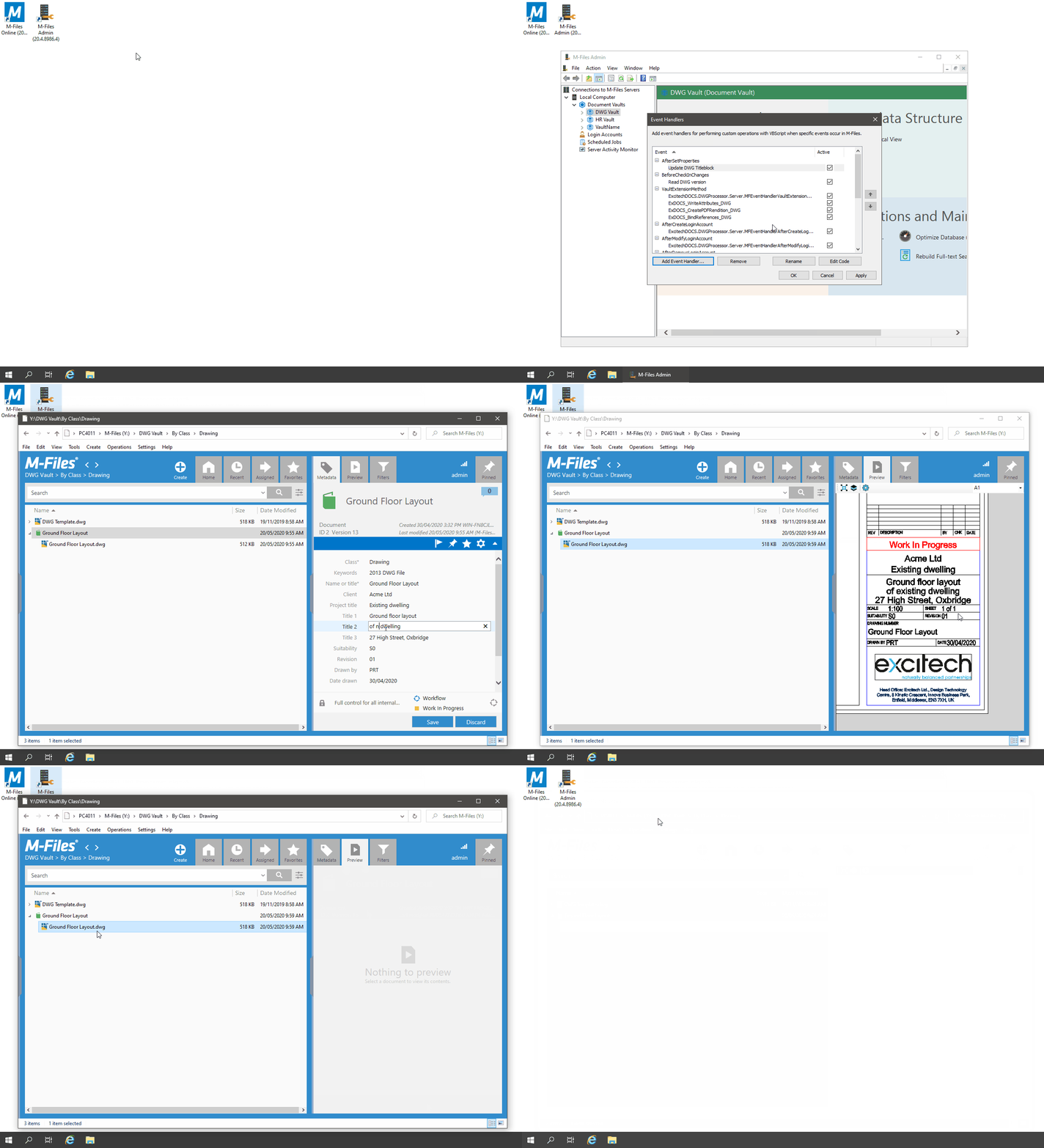
Example
- Open the M-Files Admin, then expand 'Connections to M-Files Servers\Local Computer\Document Vaults'
- Right-click on the vault you want to add an Event Handler to
- From the context menu select 'Event Handlers'
- In the 'Event Handlers' dialog box, select 'Add Event Handler'
- Select the 'AfterSetProperties' event and enter a name for the new handler
- Click 'OK'
- Select the newly created event handler and click 'Edit Code'
- In the 'Edit VBScript Code' window, add the following code:
'create ExcitechDOCS DWG Processor object
Set dwgProcessor = GetExtensionObject("ExcitechDOCS.DWGProcessor")
'store Object details in TransactionCache, to prevent recursive loop
If IsNull(TransactionCache(ObjVer.ToJSON)) Then
TransactionCache(ObjVer.ToJSON) = "Synced"
'sync properties from M-Files
dwgProcessor.SyncPropertiesFromMFiles Vault, ObjVer, ActivityID
'set modifying user
dwgProcessor.SetModifiedBy Vault, ObjVer, CurrentUserID
End If
The resulting log file would contain the following information:
01/01/2019 09:00:00:2672 - Sync Properties from M-Files
01/01/2019 09:00:00:2752 - DWG File Count: 1
01/01/2019 09:00:00:2762 - Creating RealDWG COM Object. (dllhost.exe)
01/01/2019 09:00:00:5532 - Call SyncPropertiesFromMFiles COM method.
01/01/2019 09:00:00:6372 - Processing Object: ID 15 Version 3
01/01/2019 09:00:00:6502 - FileVer: ID 16 Version 2
01/01/2019 09:00:00:6502 - Download DWG to temp file: C:\ProgramData\Excitech Docs\DWG Processor\Temp\adnw1dqz.dwg
01/01/2019 09:00:00:6772 - Open DWG file
01/01/2019 09:00:00:7472 - Update attribute values of matching Titleblocks
01/01/2019 09:00:00:9292 - Save DWG file
01/01/2019 09:00:01:0192 - Upload updated DWG file
01/01/2019 09:00:01:0462 - Delete temp files from server
01/01/2019 09:00:01:0472 - Releasing COM object.