
Set DWG File Version in Metadata
In this example we will use the DWG Processor GetDWGInfo method to retrieve information from a DWG file, then write the DWG file version to the Keywords property. The code below could be added to any number of event handlers, but for this example we will attach the code to the BeforeCheckInChanges event.

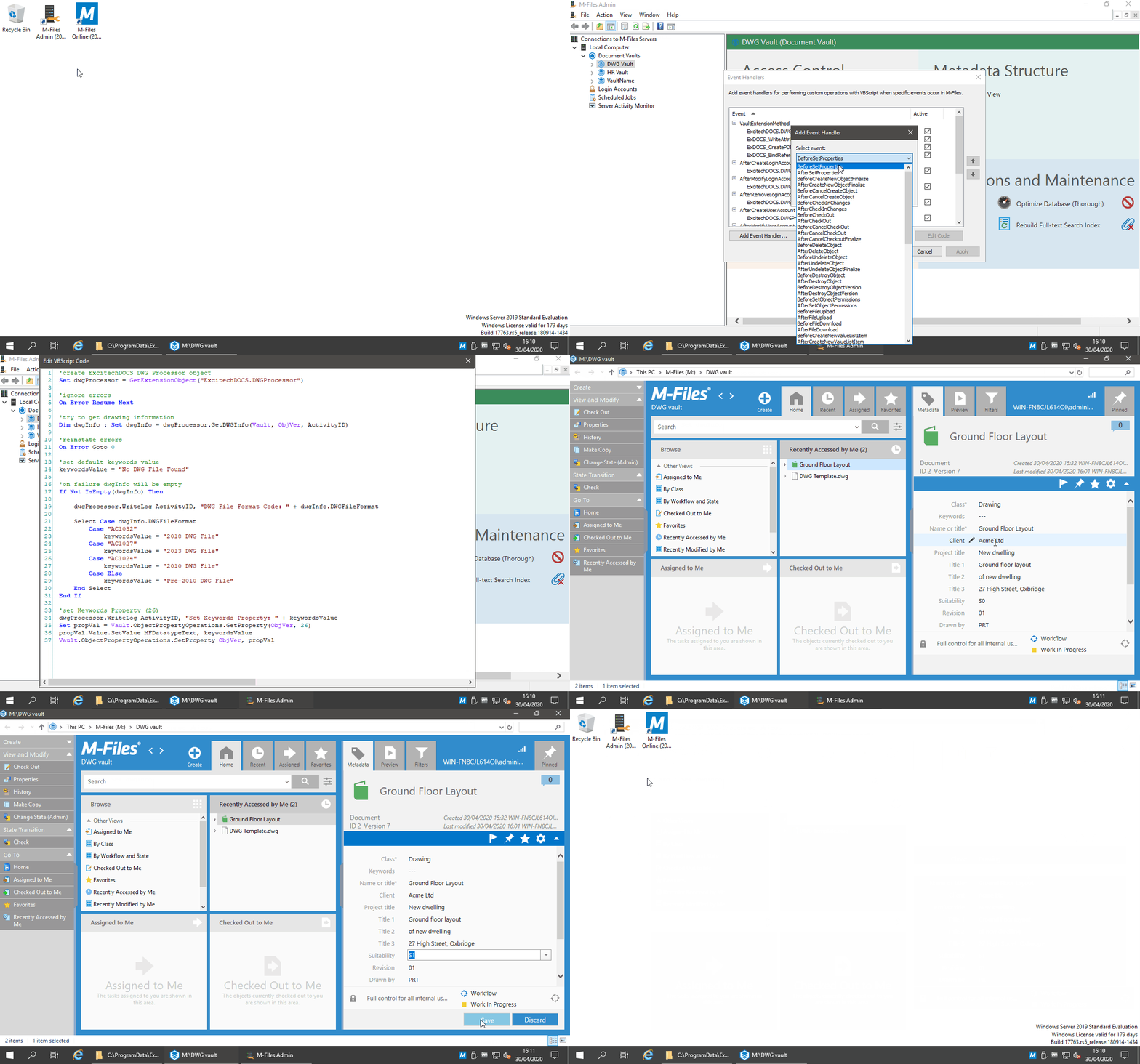
Example
- Open the M-Files Admin, then expand 'Connections to M-Files Servers\Local Computer\Document Vaults'
- Right-click on the Vault you want to add an Event Handler to (e.g. 'DWG vault')
- From the context menu select 'Event Handlers'
- In the 'Event Handlers' dialog box, select 'Add Event Handler'
- Select the 'BeforeCheckInChanges' event and enter a name for the new handler
- Click 'OK'
- Select the newly created event handler and click 'Edit Code'
- The VBScript used in this example is:
'create ExcitechDOCS DWG Processor object
Set dwgProcessor = GetExtensionObject("ExcitechDOCS.DWGProcessor")
'ignore errors
On Error Resume Next
'try to get drawing information
Dim dwgInfo : Set dwgInfo = dwgProcessor.GetDWGInfo(Vault, ObjVer, ActivityID)
'reinstate errors
On Error Goto 0
'set default keywords value
keywordsValue = "No DWG File Found"
'on failure dwgInfo will be empty
If Not IsEmpty(dwgInfo) Then
dwgProcessor.WriteLog ActivityID, "DWG File Format Code: " + dwgInfo.DWGFileFormat
Select Case dwgInfo.DWGFileFormat
Case "AC1032"
keywordsValue = "2018 DWG File"
Case "AC1027"
keywordsValue = "2013 DWG File"
Case "AC1024"
keywordsValue = "2010 DWG File"
Case Else
keywordsValue = "Pre-2010 DWG File"
End Select
End If
'set Keywords Property (26)
dwgProcessor.WriteLog ActivityID, "Set Keywords Property: " + keywordsValue
Set propVal = Vault.ObjectPropertyOperations.GetProperty(ObjVer, 26)
propVal.Value.SetValue MFDatatypeText, keywordsValue
Vault.ObjectPropertyOperations.SetProperty ObjVer, propVal
- When a DWG document is edited / checked in (not immediately), the Keywords property is updated:
The resulting log file would contain the following information:
30/04/2020 16:00:33:4012 - Get Drawing Information
30/04/2020 16:00:33:4327 - DWG File Count: 1
30/04/2020 16:00:33:4327 - Creating RealDWG COM Object. (dllhost.exe)
30/04/2020 16:00:33:5884 - Call GetDrawingInformation COM method.
30/04/2020 16:00:34:4485 - Processing Object: ID 2 Version 6
30/04/2020 16:00:34:4794 - FileVer: ID 2 Version 1
30/04/2020 16:00:34:4794 - Download DWG to temp file: C:\ProgramData\Excitech Docs\DWG Processor\Temp\c3fcdc62-3b70-4f17-9d2d-851ff1789aa6\Ground Floor Layout.dwg
30/04/2020 16:00:34:5104 - Open DWG file
30/04/2020 16:00:34:9642 - Create DrawingInfo object
30/04/2020 16:00:34:9642 - Populate file format
30/04/2020 16:00:34:9791 - Populate current layout: A1
30/04/2020 16:00:34:9791 - Populate Layout array
30/04/2020 16:00:34:9950 - Populate DWG References
30/04/2020 16:00:34:9950 - Populate Image References
30/04/2020 16:00:34:9950 - Populate PDF References
30/04/2020 16:00:35:1666 - Delete temp folder from server: C:\ProgramData\Excitech Docs\DWG Processor\Temp\c3fcdc62-3b70-4f17-9d2d-851ff1789aa6
30/04/2020 16:00:35:1666 - Deserialize drawing information from JSON.
30/04/2020 16:00:35:1825 - Releasing COM object.
30/04/2020 16:00:35:2604 - DWG File Format Code: AC1027
30/04/2020 16:00:35:2604 - Set Keywords Property: 2013 DWG File