Delete Users
To keep the list of PMA users current and tidy, Contract Admins can select and delete users from the "Manage Users" page.
Deleting a user will prevent that user from using the license associated with the company they were present in. Multiple users can be deleted simultaneously.
After selecting the desired contract, the Contract Admin must select the user (or users) that they wish to delete by clicking the small box to the left of their name. This will highlight them in blue for ease of legibility, as shown below.
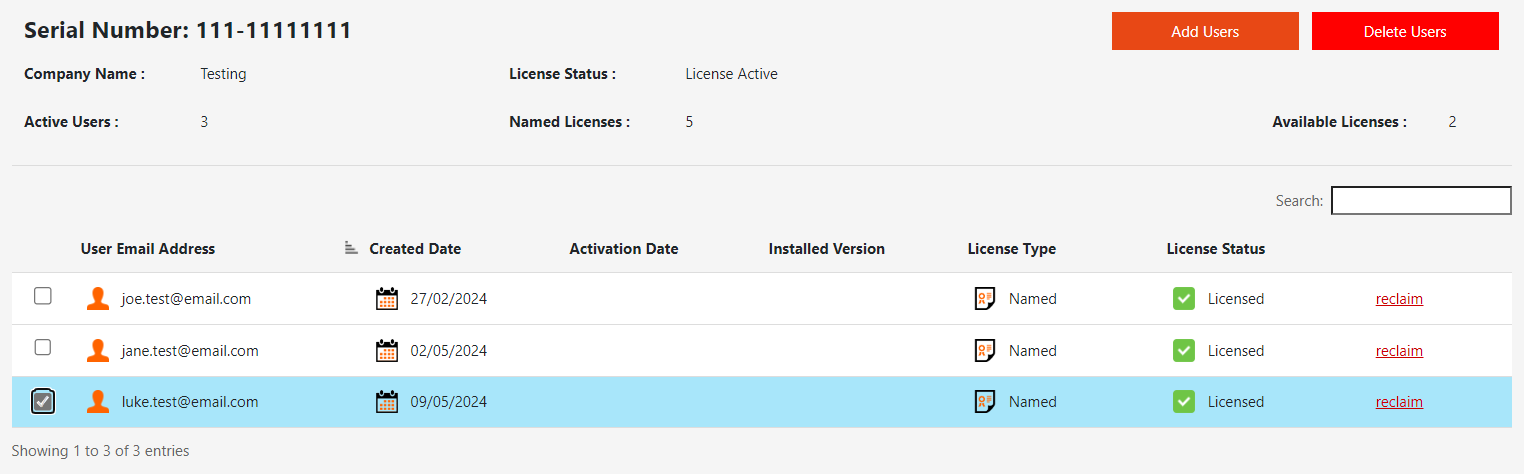
Once all applicable users have been selected, click the "Delete Users" button found at the top right of the table interface.

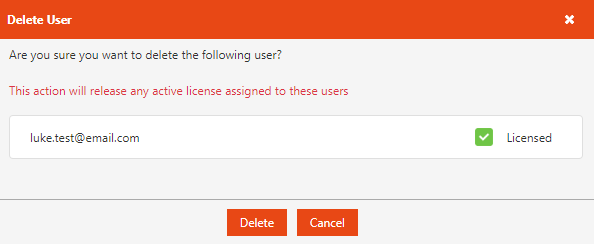
Once the button has been clicked, a prompt will appear displaying all users selected for deletion, while also displaying if they have an active license assigned to them.
Upon clicking "Delete", all users within the prompt will be removed from the contract and their licenses will be revoked and available for reassignment.